PillEye – tablet, pill counter
- 3.8
- Rating
- 500.00K
- Installs
- Free
- Price

 Analysis by App-foxy
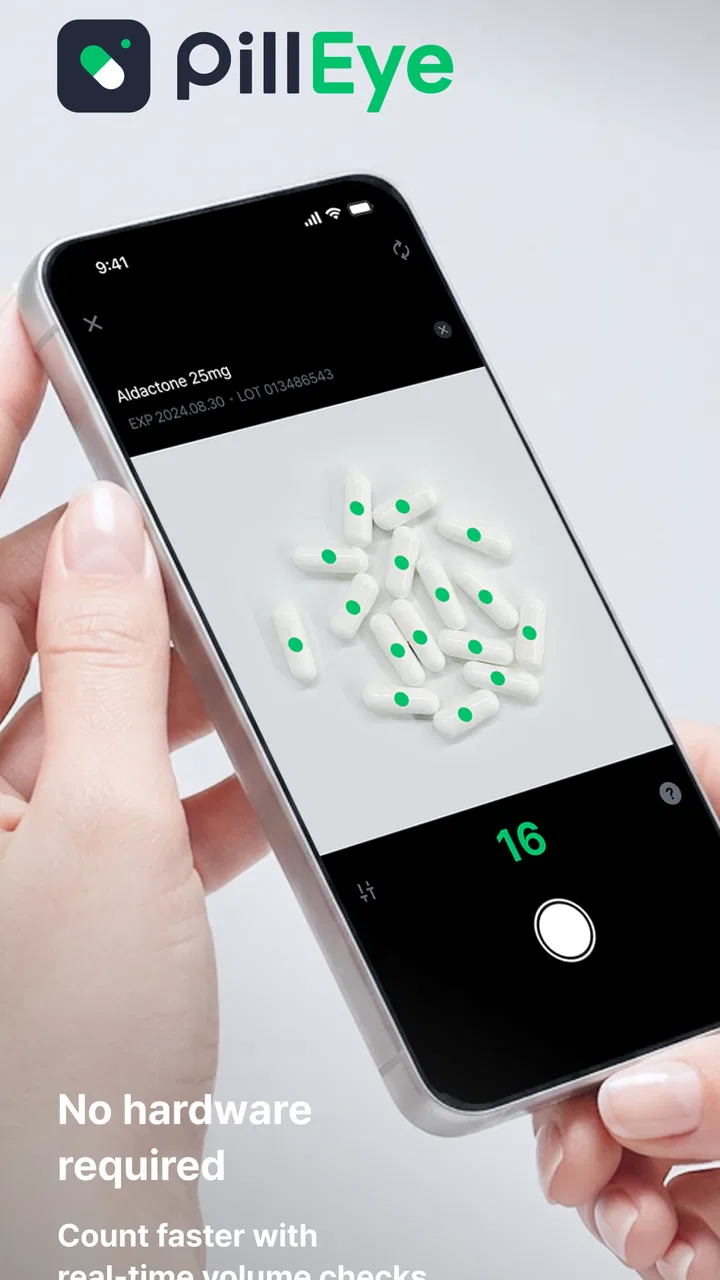
I approached PillEye as a practical medical utility rather than a replacement for a pharmacist. Its purpose is simple: use a picture to help count pills or tablets. That narrow focus is also its main appeal. Instead of manually touching every tablet or trying to estimate a large quantity by eye, you can place the medication where the camera can see it and let the app assist with the count.
That sounds like a small convenience, but it can matter in everyday pharmacy work, stock checks, medication preparation, and routine household organization. My overall impression is that this is a specialized tool with a clear job. It is most useful when speed and consistency matter, but it still needs a careful human check before the result is used for dispensing or a patient’s treatment.
How PillEye fits into real medication counting
The app comes from Medility and belongs to the medical category. It is free to download, with optional in-app purchases ranging from $7.49 to $25.99 per item. The age rating is Everyone, and the app runs on Android devices using Android 6.0 or later. Its current version is 3.9.2, which gives existing users a useful reference point when checking whether their installation is up to date.
You May Also Like

 Blood Strike: 2.5 Anniversary
Blood Strike’s Loadouts Turn Every Drop Into a Tactical Gamble
A close look at Blood Strike’s custom loadouts: how fast access to signature weapons reshapes its battle royale rhythm, rewards preparation, and narrows the gap between fights.

 Pandora - Music & Podcasts
Pandora’s Music Is Easy to Start, but Harder to Recover
Pandora’s strength is its low-effort path from a seed to a station. Its weak spot is how much confidence it asks you to place in connection, setup, and quiet recovery.

 8 Ball Pool
 Is Built on Rivalries, Rematches, and Routine
A close look at the rivalries, rematches, shared routines, and unanswered safety questions that turn a quick pool match into a persistent mobile community.

 Samsung Music
’s Quiet Strength Is Playing What You Already Own
Its reach comes less from spectacle than from dependable access to a personal library. That simplicity is both the app’s strongest retention engine and its ceiling.

 AccuWeather: Weather Radar
AccuWeather Review: A Quick, Clear Forecast for Everyday Decisions
For everyday plans, the best forecast is the one you can understand quickly. AccuWeather makes rain timing, radar, and local conditions easy to act on, with a few trade-offs.

 Hill Climb Racing
Why Hill Climb Racing Still Turns Crashes Into One More Run
A tiny car, a bumpy hill and one more upgrade: Hill Climb Racing keeps resurfacing because its simple chaos makes every near-miss feel personal.
More From Our News Desk



Its central workflow is much more direct than a full pharmacy-management system. You take a picture of pills or tablets, and the app analyzes the image to produce a count. That makes it different from medication reminder apps, barcode databases, prescription organizers, and inventory platforms. Those tools may tell you what a medicine is, when to take it, or how much stock is recorded. PillEye addresses a more specific question: how many visible units are in front of me?
In my view, that distinction is important. A person looking for reminders, interaction warnings, prescription renewal tracking, or patient records will not find this to be a complete medication companion. Someone who repeatedly needs to count loose tablets may find the focused approach much more valuable than a larger app filled with unrelated functions.
The app has already reached over 500 thousand installs and holds an average rating of 3.9 from around 1.6 thousand ratings. Those figures suggest that it has attracted meaningful interest, while also indicating that the experience is not universally effortless. I would read the rating as a reason to test it with your own medication setup rather than assuming every tablet, surface, and lighting condition will produce the same result.
A useful workflow begins before taking the picture
The quality of the count depends heavily on how you prepare the scene. I get better results when tablets are spread out rather than piled on top of one another, with enough separation for their edges to remain visible. A plain, contrasting surface is more helpful than a patterned countertop, and even lighting is preferable to strong shadows or glare.
This is one of the less obvious realities of a camera-based counter: the app is not simply counting objects in the abstract. It is interpreting what the camera can distinguish. Two tablets touching may look like one shape, while a reflective coating can create highlights that confuse the outline. If I were using it during a busy shift, I would treat arranging the sample as part of the counting process, not as an optional extra.
A sensible routine is to place a manageable quantity in the camera view, capture the image, and then compare the result with a quick visual check. If the count matters for dispensing, I would repeat the image from a slightly different arrangement instead of trusting one scan blindly. This double-check takes less time than correcting an avoidable counting mistake later.
Where the app can save time
The strongest use case is repetitive counting. A pharmacy worker handling a tray of similar tablets may not want to touch each unit individually, particularly when several batches need to be checked. A caregiver organizing medication supplies may also appreciate a faster way to estimate remaining stock before deciding whether a refill is needed.
There is a practical household scenario here. Imagine checking a bottle of tablets after returning from the pharmacy, or separating a supply into daily organizers. Rather than counting every piece one by one, I could arrange the tablets in a visible layer, photograph them, and use the result as a first count. I would still verify the number manually if it affected dosing, but the app could make the initial inventory much quicker.
It may also be useful for comparing a physical supply with a written stock note. If the two numbers disagree, the disagreement becomes a prompt to investigate rather than something to ignore. That is a better workflow than treating the app as an authority: use it to identify possible discrepancies, then resolve them with a second count and the medication packaging.
What the current version means for existing users
Version 3.9.2 is the current release, so users who have kept the app installed should check that their device is running that version before judging the present experience. Product evolution matters with a visual tool because camera handling, recognition behavior, and compatibility can change over time, even when the basic purpose remains the same.
I would not assume that updating automatically changes every limitation of the underlying task. A newer version can improve the overall experience, but tablets still need to be visible, separated, and reasonably well lit. Existing users who previously abandoned the app after poor results may find it worthwhile to retest it using a cleaner setup, while remembering that a difficult pill shape or crowded image can remain difficult for any camera-based system.
The app’s release history begins in December 2020, which places it beyond the stage of being a brand-new experiment. That gives it a more established place in this narrow category, but it does not turn a visual estimate into a clinically verified measurement. I see the current release as a reason to evaluate the tool on its practical behavior, not as a reason to remove human oversight.
For someone already using it, the most useful change in practice may be adopting a consistent counting routine. Use the same kind of surface, avoid photographing through a container when possible, and keep the camera parallel to the tablets. Consistency makes it easier to notice when a result looks unusual. If the app produces a count that conflicts with what is plainly visible, stop and rearrange the sample instead of trying to average the two answers.
Important boundaries in pharmacy and home use
The app should not be treated as a substitute for a pharmacist’s final verification. Counting is only one part of medication safety. The identity, strength, expiration information, storage condition, and prescribed instructions still need to be checked through the proper sources. PillEye can help answer a quantity question, but it does not make an unknown tablet safe to take.
This matters especially when different medicines have similar shapes or colors. A visual counting tool may help count what is placed in front of it, but counting does not confirm that the tablets belong to the intended container. I would never use a count from the app to identify an unlabelled pill or to resolve uncertainty about a prescription.
There is also a difference between counting loose tablets and counting tablets inside a bottle. If the contents are hidden, overlapping, or distorted by the container, the camera has less useful information. Emptying medication onto a clean surface may improve visibility, but that introduces handling concerns. For medicines that should not be touched unnecessarily, or for anyone who cannot safely manage loose tablets, manual pharmacy assistance is the better option.
Another limitation is workflow friction. Taking a good picture can be slower than expected if tablets roll together, the room is dim, or the surface creates reflections. In a very small count, simply counting by hand may be faster. The app becomes more attractive when the quantity is large enough, or when repeated manual counting creates a meaningful burden.
Who will benefit most from this focused tool
I would recommend trying PillEye to pharmacy staff, small medication-handling teams, caregivers, and organized users who regularly count visible tablets. It is also a reasonable option for someone who wants a quick stock estimate before checking packaging and records. The free entry point makes experimentation easy, although the optional purchases are worth considering if you expect to depend on the app frequently.
I would be more cautious about recommending it to a person seeking a complete medication-management system. If your priority is reminders, refill scheduling, interaction information, dosage records, or communication with a healthcare professional, a dedicated medication organizer will fit better. PillEye is not weakened by lacking those functions; it is simply designed around a different problem.
It is also not the right choice for high-stakes counting without verification. A pharmacy may use it as an efficiency aid within a controlled checking process, but not as the only safeguard. At home, I would use it for convenience and cross-checking, never to decide whether taking an uncertain tablet is safe.
Three practical habits that improve the experience
First, count in batches that remain visually manageable. A huge pile may seem faster, but overlapping units can make the image harder to interpret. Several clear scans can be more dependable than one crowded photograph, especially when the result will be compared against a stock record.
Second, keep a rejected or already-counted area separate from the uncounted tablets. This prevents a common human error: taking a second picture while accidentally mixing counted units back into the sample. The app can assist with the visual count, but the physical workflow still determines whether the overall process stays accurate.
Third, use an independent confirmation when the number matters. A second arrangement, a manual recount, or a comparison with the expected quantity gives you a way to catch an obviously wrong result. I consider this the best trade-off between speed and caution: let the app reduce the repetitive work, then reserve human attention for verification.
What I would like users to watch over time
Because this is a specialized visual tool, I would watch how reliably it handles the particular tablets used in your setting. Results that look good with one shape or finish may not transfer perfectly to another. Build confidence from repeated, sensible checks rather than from a single successful scan.
I would also pay attention to whether the app fits your real workflow after the novelty wears off. If arranging tablets and checking images consistently saves time, it has earned a place in your routine. If preparing the scene takes longer than counting manually, the simpler alternative may be better. The right measure is not how clever the camera feature seems, but whether it reduces effort without reducing care.
The optional purchase model is another point to consider. Since the app is free to start, you can evaluate the basic experience before spending money. I would only pay for additional access if the app proves dependable with the medications and quantities you actually handle. A purchase should support a workflow that already works, not be treated as a guarantee of accuracy.
My final view is positive but deliberately measured. PillEye offers a useful answer to a narrow, real-world problem and is more interesting than a simple manual tally when repeated counting is involved. Its best role is as a fast visual assistant inside a careful process. Use it to speed up counting, not to replace medication verification.
For the right user, that distinction makes the app genuinely practical. For someone wanting a full health organizer or certainty about an unknown pill, another medical tool or a qualified professional will be a better choice. I would try it with a small, low-risk counting task first, learn which setup gives the clearest results, and then decide whether its convenience justifies a regular place in my routine.
FAQs for PillEye – tablet, pill counter
01What is PillEye and how does it work?
PillEye is a mobile application designed to help users count and manage their medication easily. Utilizing advanced image recognition technology, the app allows you to capture images of your pills with your smartphone camera. It then automatically counts and records the number, providing a convenient way to track your medication usage.
02Is PillEye compatible with both Android and iOS devices?
Yes, PillEye is available for both Android and iOS platforms. You can download it from the Google Play Store for Android devices and the Apple App Store for iOS devices. The app is optimized for performance on a wide range of smartphones and tablets, ensuring accessibility for most users.
03How accurate is the pill counting feature in PillEye?
PillEye uses state-of-the-art image recognition technology to ensure high accuracy in pill counting. While it performs well under most conditions, users are advised to take clear, well-lit photos for optimal results. It is also recommended to double-check the count, especially in critical medical scenarios.
04Does PillEye store my personal medication data securely?
Yes, PillEye prioritizes user privacy and data security. The app implements robust encryption protocols to safeguard your personal and medication data. However, users should be mindful of their device security settings to ensure their information remains protected from unauthorized access.
05Are there any subscription fees or in-app purchases in PillEye?
PillEye offers a basic version for free, which includes essential features for pill counting and management. For advanced functionalities, such as detailed analytics and reminders, users can opt for a premium subscription. Pricing details are available within the app, and you can choose a plan that suits your needs.
Pros
- Accurately counts pills using AI.
- Supports multiple pill types and shapes.
- User-friendly interface for easy use.
- Quick setup with minimal input required.
- Reduces human error in pill counting.
Cons
- Requires a stable internet connection.
- Limited offline functionality.
- High battery consumption during use.
- Occasional miscounts with unusual shapes.
- Subscription needed for full features.

PillEye – tablet, pill counter
Gallery